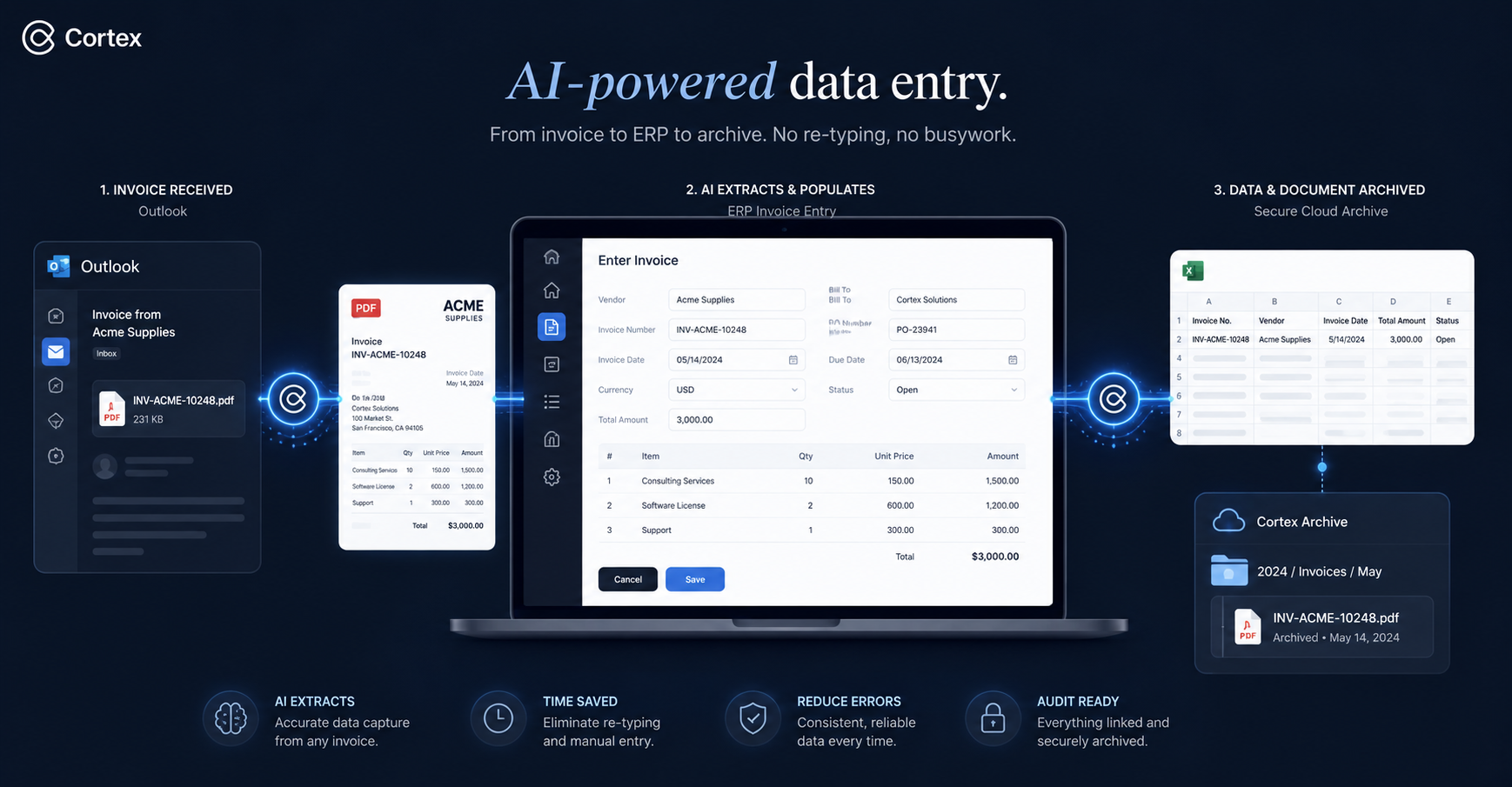
Cortex Workspace is an AI operator that executes finance tasks directly inside Outlook, Excel, and your ERP — whether that's QuickBooks, Xero, NetSuite, or SAP. It replaces the mechanical work that slows every accountant down: pulling invoices out of email, typing line items into bill forms, reconciling against bank statements, and renaming files for audit. Unlike chatbot-style tools that only give advice, Cortex takes action inside the same applications your team already uses.
For the full AI-in-accounting overview — tools, workflows, and automation across every pillar — see our AI in Accounting guide.
- Zero Re-typing — Cortex reads invoice PDFs from Outlook or Slack and extracts dates, amounts, vendors, and tax lines automatically.
- Direct ERP Entry — It opens your ERP in the browser, creates bills, and maps each line to the correct account — no integration required.
- Auto-Reconciliation — Cortex compares bank CSVs to your ledger in Excel, flags matches, and highlights discrepancies with a reason.
- Audit-Ready Filing — Processed invoices are renamed (
Date_Vendor_Amount) and archived to SharePoint or your local server.
- No IT project required — Cortex runs on your computer and works with the systems you already have.
Cortex is designed for AP accountants, GL accountants, bookkeeping firms, and startup finance leads who process invoices at volume. If your team handles high-frequency reimbursements or monthly close across multiple systems — e-commerce, manufacturing, professional services, or any agency doing outsourced bookkeeping — this workflow applies to you.
Every finance team runs some version of the same four-step loop:
- Invoice capture — Vendor PDFs arrive in Outlook or Slack and have to be opened one by one.
- Data entry — Each invoice gets re-typed into the ERP (QuickBooks, Xero, NetSuite, SAP) — date, vendor, amount, tax rate, account code.
- Reconciliation — Bank statements get exported to Excel and matched against ledger entries using VLOOKUP or manual eyeballing.
- Archiving — Every invoice gets renamed and filed somewhere audit-friendly.
None of this requires accounting judgment. All of it consumes most of an accountant's day.
- Physical data transfer — Split screen, PDF on the left, ERP form on the right, typing numbers back and forth. Eye-strain work that scales linearly with volume.
- Fragmented reconciliation — Context-switching between the bank portal, Excel, and the finance system. VLOOKUP acrobatics to find one missing line.
- Mechanical file management — Hundreds of invoices per month that all need renaming and sorting by hand.
- Error risk — A 1% typo rate on balance-sheet entries is enough to trigger audit issues.
- Senior talent on junior work — Experienced accountants spending 70% of their time on copy-paste instead of analysis.
- Close-cycle bottleneck — Month-end becomes a pile-up because every invoice has to move through a human first.
Cortex acts as an operator across your existing tools. It watches what you do once, then repeats it reliably across every invoice that comes in.
Cortex locates the attachment in Outlook, downloads the PDF, and reads its contents visually. It identifies the invoice number, date, amount, tax, and vendor — even when the fields sit in different places on different vendor templates.
You don't write rules or train a model. You show it one invoice and describe what you want; it handles the rest.
Cortex launches your browser, logs into the ERP, and opens "New Bill" the same way you would. It fills each field with the extracted values and picks the correct account code based on rules you set — for example, "Vendor A → Office Rent".
Because it drives the actual UI instead of calling an API, it works on any ERP. No integration, no IT ticket.
Cortex compares your bank CSV against the ledger in Excel. Matches are marked in green. Discrepancies are highlighted with a likely cause — FX difference, bank fee deducted, timing mismatch. You review the flagged rows, not every single line.
Once an invoice is booked, Cortex renames the file to Date_Vendor_Amount and files it into the right SharePoint folder or local directory. Every processed invoice is traceable by name, ready for audit.
The meaningful shift isn't speed alone — it's what your accountants spend their day on.
- From data entry clerk back to finance advisor. Accountants spend their time on analysis, not transcription.
- Error rate drops to near zero. Numbers come from the source document, not from someone's keyboard.
- Month-end becomes every day. Invoices get processed as they arrive, so close stops being a crunch.
- Audit prep is trivial. Every invoice has a consistent filename and a clear trail.
The four steps above are a proven starting point, not a fixed process. Cortex is command-driven — your team can modify or extend any step in plain language, no code required.
Common extensions:
Approval routing. Once a bill is drafted in the ERP, Cortex can send it to the correct approver based on amount thresholds and department.
Multi-entity consolidation. For groups with multiple legal entities, Cortex can split invoices, post each leg to the right entity, and produce a consolidation worksheet at period-end.
Period-end packs. When close wraps, Cortex can pull the final ledger, generate a variance commentary against budget, and draft the management summary.
If a task currently moves data between your inbox, ERP, Excel, or file server, it can be described to Cortex as a command and executed on demand.
Pick the slice of your close cycle that hurts the most — usually invoice entry or reconciliation — and let Cortex run it once under your supervision. Cortex runs on your computer, works with your existing ERP, and doesn't need any integration or IT approval.
Your next month-end can start with a clean, reconciled ledger instead of a stack of PDFs.
Cortex handles cross-system execution inside the apps you already use. For point solutions — bookkeeping platforms, tax research, document capture — see our comparison of 12 AI tools for accountants in 2026, grouped by workflow with documented failure modes and firm-fit guidance. Tax-season teams should also read Best AI Tools for Tax Preparation in 2026 for Dext, Keeper, TaxGPT, and Cortex by prep workflow.