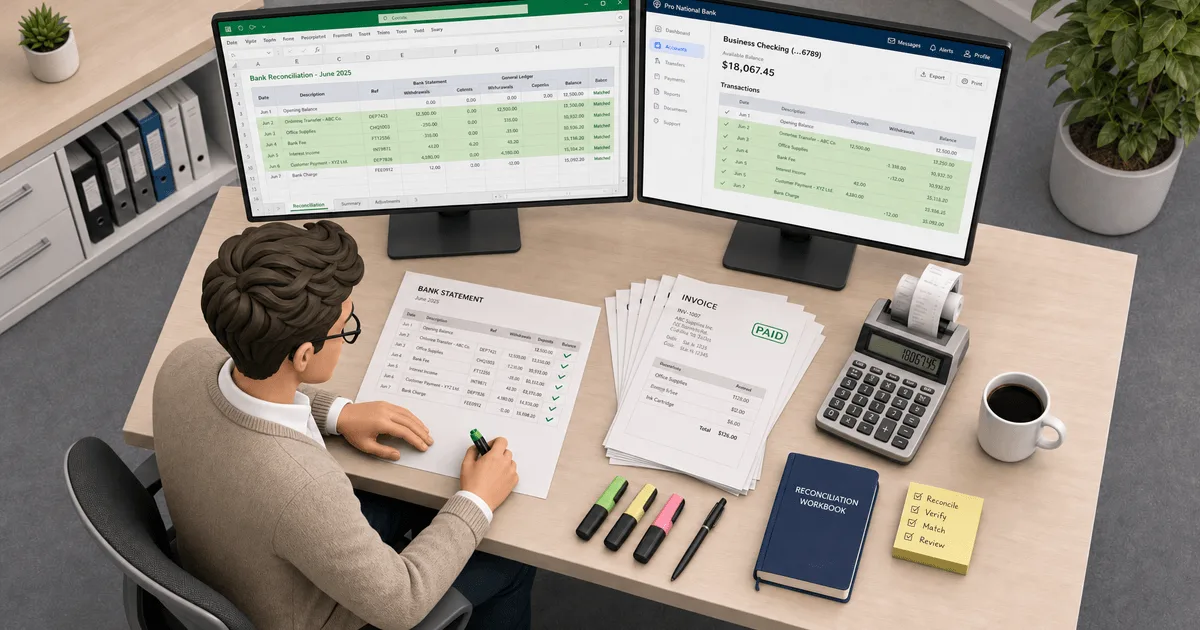
This guide explains what account reconciliation software is, how rule-based and AI-driven matching differ, and which tools fit SMB teams versus enterprise finance departments. It compares seven platforms by team size, pricing direction, and implementation effort.
Evaluations draw on vendor documentation, industry benchmarks (Thomson Reuters, Trintech, The Hackett Group), and workflows Cortex clients run during month-end close. Use the comparison table and vendor checklist to shortlist tools, then validate match rates on your own transaction data before you buy.
For a full overview of AI in accounting — including tax prep, invoicing, and reporting — see our AI in Accounting guide.
- Account reconciliation software compares internal ledgers to external statements (bank, card, GL) and routes exceptions for human review.
- Bank reconciliation is the highest-ROI starting point for most SMB teams still copying statement data by hand.
- Rule-based matching is predictable; AI-driven matching handles partial payments, fees, and novel exceptions at higher volume.
- A wealth management accounting team used Cortex Workspace to cut reconciliation time by 83%, reconciling PDF statements, Excel workbooks, and live portal data in one workspace with exact cell-level exception pointers.
- Cortex Workspace and Xero suit freelancers and small teams; FloQast, BlackLine, and ReconArt scale with entity count and audit requirements.
Account reconciliation software is a digital tool that compares internal financial records against external statements, such as bank statements or credit card processing reports, to ensure they match. As a category of reconciliation software, it centralizes matching and review so finance teams can resolve exceptions faster. When discrepancies arise, the software automatically flags them for human review.
Historically, accountants performed this task using printed statements, highlighters, and massive Excel spreadsheets. Today, automated account reconciliation software and modern bank reconciliation tools integrate directly with your financial systems, doing the heavy lifting in seconds. Whether you are looking for robust financial reconciliation software to manage global subsidiaries or simple auto reconciliation software for a growing startup, the goal remains the same: accuracy, speed, and visibility. These reconciliation tools can function as a standalone reconciliation platform or plug into your existing ERP and banking stack.
This guide breaks down how it works, what separates good tools from great ones, and how to pick the right fit depending on whether you're a freelancer using a desktop app like Cortex Workspace or a finance department closing the books for a $500M organization.

Manual reconciliation fails at scale because spreadsheet workflows, manual entry error rates, and month-end volume compound every close. For most accounting teams, month-end close looks the same every time: collect a dozen spreadsheets, chase down missing receipts, cross-reference bank statements row by row, and hope nothing was mis-entered. According to The Hackett Group research cited by Trintech, accountants and financial personnel spend up to 65% of their time on manual, low-value processes, and that's before accounting for the errors that come with them.
Manual data entry carries an inherent error rate of 0.8% to 2.0% (Trintech / Resolve Pay). At scale, that compounds fast. A single decimal in the wrong column can misrepresent a balance sheet, trigger a compliance flag, or push the close back by days.
The root problem is that most finance teams are still doing the same data-shuffling work that AI tools can now handle: copying figures from a bank PDF into a spreadsheet, re-entering invoices from one system into another, chasing approvals over email. Tools like Cortex Workspace are built specifically to eliminate this kind of low-value, high-volume copying work: you drop in a document, and the AI reads it, extracts the relevant figures, and moves them where they need to go, while you review.
Match these bank statement lines to the invoices in this folder and flag any amount mismatches over $50.
The good news: teams that switch to automated reconciliation software typically cut reconciliation labor time by 50-75% and close the books 30-50% faster (Abacum, Thomson Reuters). That's not marketing copy: it's the measurable difference between a team spending two weeks on close versus three days.
At its core, this software does three things:
- Ingests data directly from your bank, ERP, or accounting system, with no manual CSV uploads needed.
- Matches transactions using rules or AI to pair records that belong together.
- Flags exceptions (transactions that don't match) for a human to review.
The output is a clean, auditable trail showing who matched what, when, and who approved it inside your reconciliation platform. That's what auditors want to see, and it's what most manual processes fail to produce reliably.
A wealth management firm's accounting team reconciled client portfolio statements every month by juggling three separate data sources and constantly copying figures between them.
The inputs:
- PDF account statements: official client reports from custodians and fund administrators
- Excel working papers: the team's internal reconciliation spreadsheets
- Live portal data: real-time balances and transaction exports pulled from the firm's internal wealth management system
Before Cortex, reviewers opened the PDF in one window, the Excel file in another, and the internal portal in a third. They manually copied figures row by row, cross-referenced totals, and flagged mismatches by hand. Context switching alone added hours to every close, and every copy-paste step introduced another chance for error.
The team adopted Cortex Workspace because it sits directly inside their existing desktop environment. Instead of uploading files to a cloud tool or re-entering data into a separate reconciliation portal, they pointed Cortex at all three sources in a single session:
Cortex read the PDF statement, the Excel workbook, and the live portal export simultaneously, with no manual context transfer and no re-typing totals between windows.
The entire reconciliation happened inside one integrated workspace that fit the team's existing workflow, not a new platform they had to learn from scratch.
| Metric | Manual Process | With Cortex Workspace |
|---|
| Time per reconciliation cycle | Baseline | 83% reduction |
| Match accuracy vs. human review | Reference standard | 100% consistent, zero missed exceptions |
| Data sources handled | 3 windows, manual copy-paste | PDF + Excel + live portal in one workspace |
Automated reconciliation results matched manual human review with 100% consistency, eliminating missed judgments and the repetitive labor that made month-end close so draining. Reviewers no longer spent hours on line-by-line matching. Cortex handled the bulk comparison automatically.
The team did not hand off judgment to the machine. Cortex flagged every inconsistency with precise row and cell references in the Excel workbook, so reviewers could jump straight to the exact location, verify the finding in seconds, and approve or override with full context.
That human-in-the-loop design meant accountants stayed in control of every exception. Cortex did the exhaustive cross-check; humans did the professional sign-off. No black-box output, no disconnected error reports. Reviewers got native, actionable pointers inside the files they already used.
For teams still reconciling across PDFs, spreadsheets, and internal portals, this is the practical difference between reconciliation software you adopt and reconciliation software you actually use.
Most legacy tools use rule-based matching: you define a set of conditions (e.g., "match transactions where amount = amount and date is within 3 days") and the software executes them. It's fast and predictable, but rigid. Anything outside your rules goes into an exceptions queue.
AI-driven reconciliation works differently. Instead of fixed rules, the software learns from historical data. It recognizes patterns, handles partial matches, and flags anomalies it has never been told to look for. According to insightsoftware, AI-powered reconciliation can autonomously complete up to 95% of the process, including complex exceptions that rule-based systems would kick back to a human.
In practical terms: a rule-based system will match a $1,000 bank deposit to a $1,000 invoice. An AI system will also suggest a likely match between a $999.50 payment and a $1,000 invoice where the bank deducted a $0.50 wire fee, and flag it for one-click approval rather than full investigation.
If you're reconciling a high volume of transactions or dealing with multi-currency accounts, AI matching is worth paying for. For a small business with straightforward bank feeds, rules-based tools are often sufficient.
Not all reconciliation is the same. The type you need depends on where your biggest bottlenecks are.
Bank reconciliation software (also called bank account reconciliation software or cash reconciliation software) matches your internal cash ledger against daily bank feeds. Most small business accounting platforms (Xero, Cortex Workspace) include this capability and bundle easy-to-use bank reconciliation tools. For teams that are still manually copying bank statement data into their books, this is the single highest-ROI thing to automate first.
General ledger (GL) reconciliation software (also called general ledger account reconciliation software) ensures that sub-ledger balances (accounts payable, accounts receivable, fixed assets) tie back to the master GL. This is where enterprise tools like BlackLine and FloQast operate.
Intercompany reconciliation software handles eliminations and transfer pricing for multi-entity organizations. If you have subsidiaries booking transactions between each other, unreconciled intercompany balances are one of the most common causes of close delays. This is a major pain point that most buyer's guides gloss over. Dedicated modules from tools like ReconArt and BlackLine are built specifically for it.
Balance sheet reconciliation software takes a broader view, ensuring every balance sheet account is supported by underlying documentation. Often bundled into enterprise close-management platforms.
Here's how the main players stack up. No tool is universally best. It depends on your size, existing stack, and how much of the close you want to automate.
| Tool | Best For | Standout Feature | Starting Price |
|---|
| Cortex | SMBs and freelancers | AI-powered reconciliation automation across your existing tools | From $19/month |
| Xero | SMBs with multi-bank needs | 1,000+ integrations; auto-removes duplicate entries | From $25/month |
| FloQast | Small-to-mid finance teams | Excel-native checklist workflow; real-time close visibility | From ~$30K/year |
| Prophix | Mid-market ($50M-$1B revenue) | Unified CPM: reconciliation, forecasting, and consolidation in one | From ~$7.5K/year |
| Vena Solutions | Enterprise teams on Microsoft | Native Excel and Office 365 interface; no retraining required | Quote-based |
| ReconArt | Mid-to-large enterprises | Advanced automated matching across bank, AR, and GL | Quote-based |
| BlackLine | Large global enterprises | Comprehensive GL/sub-ledger automation with compliance dashboards | From ~$77K/year |
Note on pricing: Prices for enterprise tools vary significantly by seat count and configuration. Use the above as a directional guide and request a demo with your own data for an accurate quote.
This table focuses on reconciliation and close-management platforms. For a broader view of how accountants evaluate AI across bookkeeping, tax research, document capture, and multi-system work, including 12 tools with workflow-level failure modes, see our flagship guide, Best AI Tools for Accountants in 2026.
When comparing reconciliation tools in market, use this checklist to identify the best fit for your team and shortlist the best reconciliation software for your use case.
- Which ERPs do you integrate with natively? NetSuite, SAP, Oracle, QuickBooks, Xero. Is it a direct API or CSV export?
- What does the exception workflow look like? Can the reviewer approve, reject, and comment directly in the tool, or does it export back to a spreadsheet?
- Do you support multi-entity and multi-currency reconciliation? If yes, how does it handle intercompany eliminations?
- What's your match rate on day one? Most vendors will benchmark against a sample of your own data. Ask them to do this before you commit.
- What is your SOC 2 Type II status and data residency policy? Finance data is sensitive. You need to know where it lives and who can access it.
- How long does implementation typically take? Implementation timelines range from two weeks (SMB tools) to six months (enterprise platforms). Get a written estimate.
- Is there a sandbox or trial period? Testing with real data in a safe environment reveals issues that demos never show.
- What does post-implementation support look like? Dedicated CSM, shared support queue, or documentation only.
Most of the content written about account reconciliation software assumes a finance department with a controller, a close manager, and dedicated AP/AR staff. If you're a team of two or three managing books for a growing business, the enterprise framing doesn't apply.
For SMB teams, the priority order looks different:
- Start with bank reconciliation: it's the highest-volume, easiest-to-automate category. Cortex Workspace or Xero handles this well without any additional investment and provides straightforward bank reconciliation tools out of the box.
- Add a close checklist tool when your month-end involves more than four or five accounts. FloQast has an SMB-friendly entry point.
- Only consider enterprise platforms (BlackLine, Vena, Prophix) when your transaction volume, entity count, or audit requirements genuinely require them. Many mid-market companies use these tools earlier than they need to and spend months on implementations that don't move the needle.
The test: if your reconciliation pain is mostly about tracking down missing data and chasing approvals, that's a workflow problem, not a software problem. Fix the process first.
Most implementation advice is vague. Here's what consistently separates smooth rollouts from expensive failures.
Step 1: Clean your chart of accounts before you go live. No reconciliation tool can fix messy upstream data. If your GL has duplicate accounts, inconsistent naming, or orphaned transactions, sort those out first. Otherwise you're automating confusion.
Step 2: Fix the data entry bottleneck first. Before layering in a dedicated reconciliation platform, audit where data actually enters your system. If someone on your team is still re-typing figures from PDFs or bank statements into a spreadsheet, tools like Cortex Workspace eliminate that step entirely, and it's a faster win than a six-month enterprise implementation.
Step 3: Automate low-risk accounts first. Start with high-volume, low-complexity accounts (standard cash accounts, prepaid expenses). Once those run reliably, layer in higher-risk balance sheet accounts. Don't try to automate everything at once.
Step 4: Retrain your team on exception management, not data entry. When matching is automated, your team's job changes. They're no longer checking rows. They're investigating the 5% of transactions the software flagged. That's a genuinely different skill. Budget time for it.