This guide focuses on financial reporting automation. For a broader look at AI across bookkeeping, tax, reconciliation, and audit workflows, see our AI in Accounting guide.
- Financial reporting automation replaces manual copy-paste with ETL, RPA, and AI workflows that cut close cycles from 15 days to under 3.
- Financial reporting automation tools map to distinct jobs: Power Query for data shaping, RPA for legacy transfers, Cortex Workspace for variance narratives.
- Mid-market teams spend 12–17 business days on manual monthly closes; a 5-step pipeline with reconciliation controls and human sign-off reduces that risk.
- Automated financial reporting ROI can reach 680% when 1,440 annual hours are reallocated at a $65/hour loaded rate.
- Cortex Workspace runs automated financial reporting with AI locally—drafting commentary in Excel and Word without uploading ledgers to public models.
Manual financial reporting relies on copy-pasting across separate systems. One misplaced decimal or broken cell reference can distort KPIs and trigger material weaknesses in audit.
- Slower Close Cycles: Mid-market companies take 12–17 business days to close monthly books, leaving leadership with operational data weeks out of date.
- Audit and Compliance Risks: Under SOX and standard frameworks, manual data handling lacks a verifiable trail from raw ERP exports to finalized statements.
- Employee Burnout: Repetitive manual exports drain skilled accountants during year-end, accelerating turnover when teams would rather analyze margins.
Moving to automated reporting is an operational necessity—not just an efficiency upgrade—for accuracy and auditability. Teams that automate financial reporting early cut close-cycle risk before errors compound.
Choosing the right financial reporting automation tools starts with knowing where ETL, RPA, and AI each belong in the pipeline—preventing over-engineering and keeping implementation costs low.
| Technology | Best Suited For | Core Tool Examples | Typical Setup Complexity |
|---|
| Power Query (ETL) | Cleaning, formatting, and joining local structured data. | Excel, Power BI, SQL databases | Low (built-in, no code) |
| Robotic Process Automation (RPA) | Moving files and data across legacy desktop applications. | UiPath, Blue Prism, Power Automate | Medium (requires structured logic) |
| Desktop AI Workspace | Variance analysis, narrative writing, and exceptions checking. | Cortex Workspace | Low (natural language operation) |
Power Query acts as a built-in ETL (Extract, Transform, Load) engine directly inside Microsoft Excel to clean and shape financial data automatically. Instead of manually deleting blank rows, splitting columns, or running VLOOKUPs every month, you can record these formatting steps once.
When you download a new trial balance CSV, Power Query runs your recorded transformation steps instantly. This ensures that raw data from QuickBooks, Xero, or NetSuite is structured identically every month without manual intervention.
Robotic Process Automation (RPA) mimics human keystrokes and clicks to move financial data between legacy desktop software and cloud databases. If your organization relies on legacy accounting programs that lack modern API endpoints, RPA bridge bots can open the legacy software, enter credentials, navigate to the reporting module, extract the ledger, and save it to a designated folder.
RPA operates on strict, rule-based paths. It does not make decisions; it simply executes mechanical mouse movements and keyboard commands at high speeds, removing the administrative burden of data collection.
#Desktop AI Workspace for Contextual Reporting
Desktop AI Workspaces like Cortex operate directly inside your local files, sheets, and browsers to analyze financial variances and draft narrative reports. Unlike traditional static software, a Desktop AI Workspace understands the context of your ledger. It can read a 5% margin discrepancy in your COGS column and cross-reference your raw supplier invoices to identify that shipping costs drove the variance.
By running locally on your desktop, this workspace bridges the gap between structured accounting databases and the qualitative narrative reports required by corporate boards.
To automate financial reporting at scale, connect data sources, reconcile accounts, compile statements, draft commentary, and distribute with audit trails. This five-step framework gives finance teams a repeatable, auditable close pipeline.
Replace manual CSV downloads with live read-only ERP connections from NetSuite, Sage Intacct, or QuickBooks Online. A single refresh updates source balances and removes the risk of stale imports or corrupted file transfers.
Reconcile bank, card, and ledger accounts before assembling statements. Rules-based matching engines flag exceptions instead of forcing line-by-line manual review. See our account reconciliation software guide for variance matching and exception setup.
Store validated balances in flat data tables and let P&L, balance sheet, and cash flow sheets pull via dynamic formulas—not hardcoded cells. Power Pivot and DAX handle currency translation, multi-entity consolidations, and intercompany eliminations so upstream changes flow through automatically.
Variance narratives are the usual close bottleneck. A Desktop AI Workspace reads populated statements, cross-references operational logs, and drafts explanations your finance team reviews and refines before sign-off.
Publish finalized reports through encrypted, role-controlled storage—not email attachments. Enable access logs showing who viewed, edited, or downloaded each file, giving auditors a verifiable compliance trail.
For further guidance on building reliable accounting pipelines, explore Cortex accounting workflows or consult our detailed review of the best AI tools for tax preparation in 2026.
Cortex Workspace automates the narrative phase of financial reporting by reading your open local spreadsheets and drafting professional variance commentary directly in your workspace. Automated financial reporting with AI works best when the agent runs locally as a desktop operator—not an isolated web browser—interacting directly with Excel files, PDFs, and local folders.
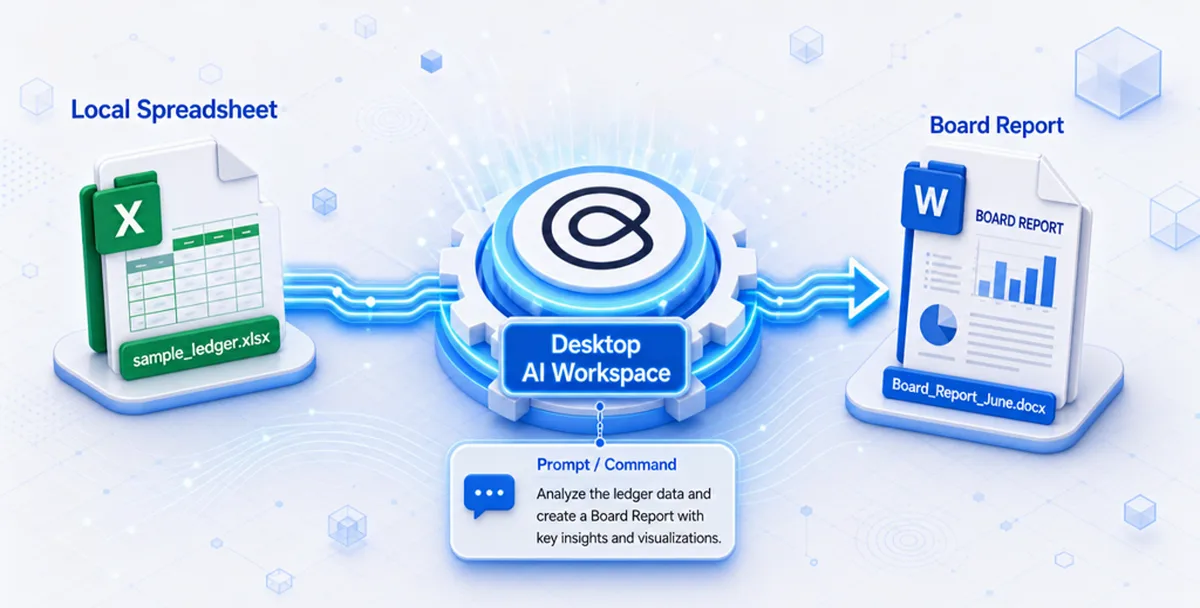
Cortex runs locally on your machine, so sensitive ledgers never leave your security perimeter or feed public training models. Unlike cloud AI tools that require uploading trial balances to external servers, Cortex reads open files on your desktop to calculate variances and flag ledger anomalies—keeping proprietary data confidential.
Cortex writes qualitative analysis directly inside your Word drafts or spreadsheets by matching numeric discrepancies with operational logs. For example, you can trigger a comprehensive reporting run on your desktop by using a direct prompt:
"Using the reconciled ledger, generate a profit-and-loss statement and balance sheet for this period. Group expenses by category and show month-over-month comparison."
This allows Cortex to parse your flat transaction tables, assemble structured statements, and generate comparative drafts instantly, saving hours of manual preparation and leaving the accountant with the simple task of reviewing and signing off.
👉 Try this prompt in Cortex Workspace to generate your financial statements automatically.
Cortex connects your routine monthly reporting data with wider corporate requirements, such as tax preparation and audit readiness. Instead of treating monthly close, annual tax filings, and regulatory reporting as isolated tasks, Cortex allows you to chain these workflows together.
For example, when preparing your corporate tax returns, you can use our guide on the best AI tools for tax preparation in 2026 to select the right processing engine for your tax documents. Cortex can then pull the necessary reconciled balances from your monthly reporting workbook and format them directly for your tax workflows.
To build a unified, automated environment that handles these processes end-to-end, explore Cortex accounting solutions to streamline your firm's entire operations under a single desktop framework.
Automated financial reporting requires strong governance, including input validation rules, manual approval gates, and exception tracking to prevent data errors from spreading. Automation accelerates data flows, which means that if bad data enters the pipeline, it can propagate through your entire reporting structure faster than manual workflows.
Establish these core controls to manage risk:
-
Input Validation Rules: Configure your data ingestion tools to reject source files with missing fields, negative cash balances, or unbalanced journal entries.
-
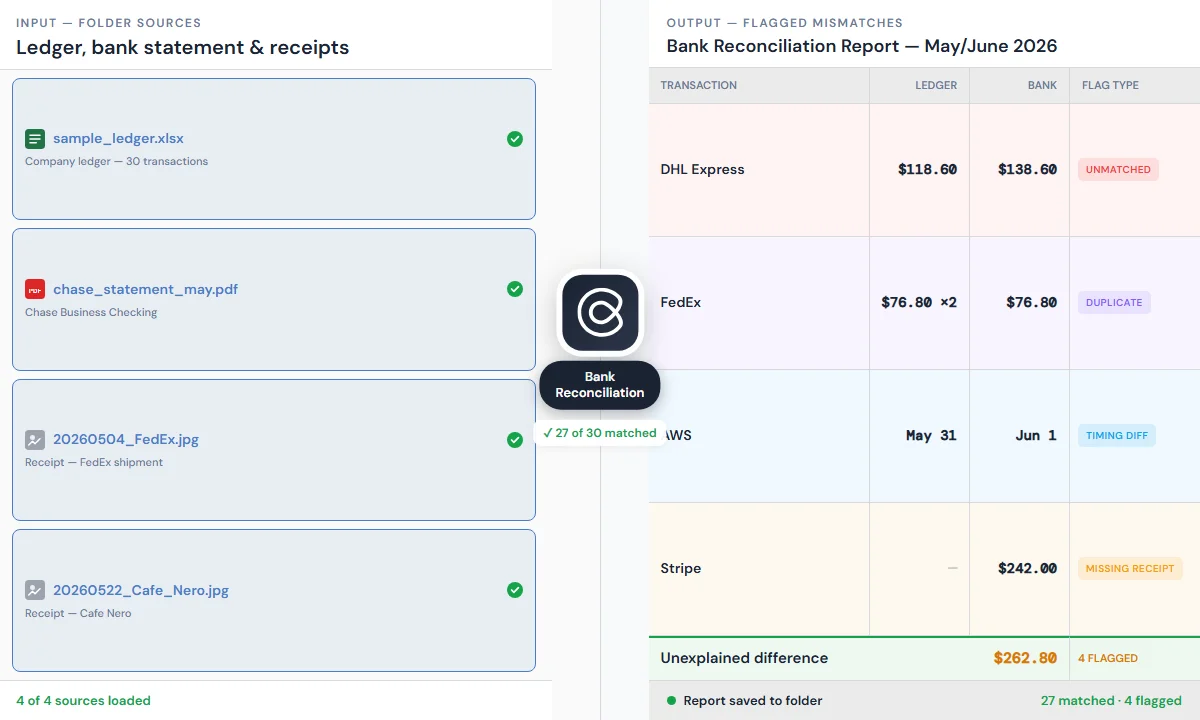
Reconciliation Thresholds: Set strict variance tolerances. Any account discrepancy exceeding your designated threshold (e.g., $100 or 0.5% of account balance) must be flagged for manual review and blocked from automated posting. You can instruct your workspace using a direct prompt like:
"Reconcile the ledger against the bank statement in this folder. For every transaction that doesn't match, flag it and note whether it's unmatched, a duplicate, a timing difference, or missing a receipt."
Using this precise instruction ensures that automation tools like Cortex Workspace flag every inconsistency for your team. You can run this reconciliation prompt directly in Cortex Workspace to test the matching rules.
-
The "Human-in-the-Loop" Gate: Never allow AI or automated scripts to publish financial reports or file tax documents without explicit human sign-off. The AI serves as an efficient draft compiler, while the professional accountant remains the final authority and validator. When Cortex Workspace assists with report compilation, it can write comments directly inside the generated Word documents when it identifies a figure or calculation that warrants closer inspection. This allows you to quickly locate and review specific entries before giving final sign-off.
-
Detailed Exception Logs: Maintain a central log of all automated runs, flags raised, and manual overrides. This ledger provides auditors with definitive proof of operational control.
The return on investment (ROI) for reporting automation is measured by calculating the reduction in hours-to-close, the elimination of manual error costs, and the reallocation of staff to strategic planning. When presenting an automation business case to corporate leadership, frame the savings using specific operational metrics.
Use this simple ROI calculation framework:
Step 1 — Annual hours saved
Annual Hours Saved = (Manual Monthly Hours − Automated Monthly Hours) × 12
Step 2 — Annual labor savings
Annual Labor Savings = Annual Hours Saved × Fully Loaded Hourly Rate
Step 3 — ROI
ROI (%) = (Annual Labor Savings − Annual Automation Cost) ÷ Annual Automation Cost × 100
- Manual close: 40 hours per accountant × 4 accountants = 160 hours/month
- Automated close: 10 hours per accountant × 4 accountants = 40 hours/month
- Hours saved: (160 − 40) × 12 = 1,440 hours/year
- Labor value: 1,440 × $65/hour = $93,600/year reallocated from administrative data entry to financial planning, risk analysis, and cash flow forecasting
If annual automation tooling costs $12,000, net savings are $81,600 and ROI is 680% (($93,600 − $12,000) ÷ $12,000 × 100).