Browser Upgrades, Scheduled Tasks & More
Bookmarks, zoom controls, agent tab indicators, scheduled tasks, and smarter AI responses.
Highlights
- Built-In Browser — Bookmarks, tab groups, zoom controls, and agent tab indicators
- Scheduled Tasks — Automate workflows on a schedule or triggered by events
- Smarter Responses — Better understanding of what you're asking before answering
What's New
Built-In Browser
Save any page as a bookmark, organize open tabs into named groups that persist across sessions, and zoom in or out per tab with keyboard shortcuts or the new nav bar indicator. When the AI agent is controlling a browser tab, a visual indicator shows exactly which tab is under agent control — so you always know what's happening and where.
Scheduled Tasks
Cortex can now run tasks on a schedule or in response to events. Set up automated workflows directly from the welcome screen or from chat — the AI can suggest creating tasks as you work. You can create, view, update, and schedule tasks without leaving the conversation.
Smarter Responses
A new intent layer analyzes your message before generating a response. This means fewer misinterpretations and more relevant answers, especially for complex or multi-part questions.
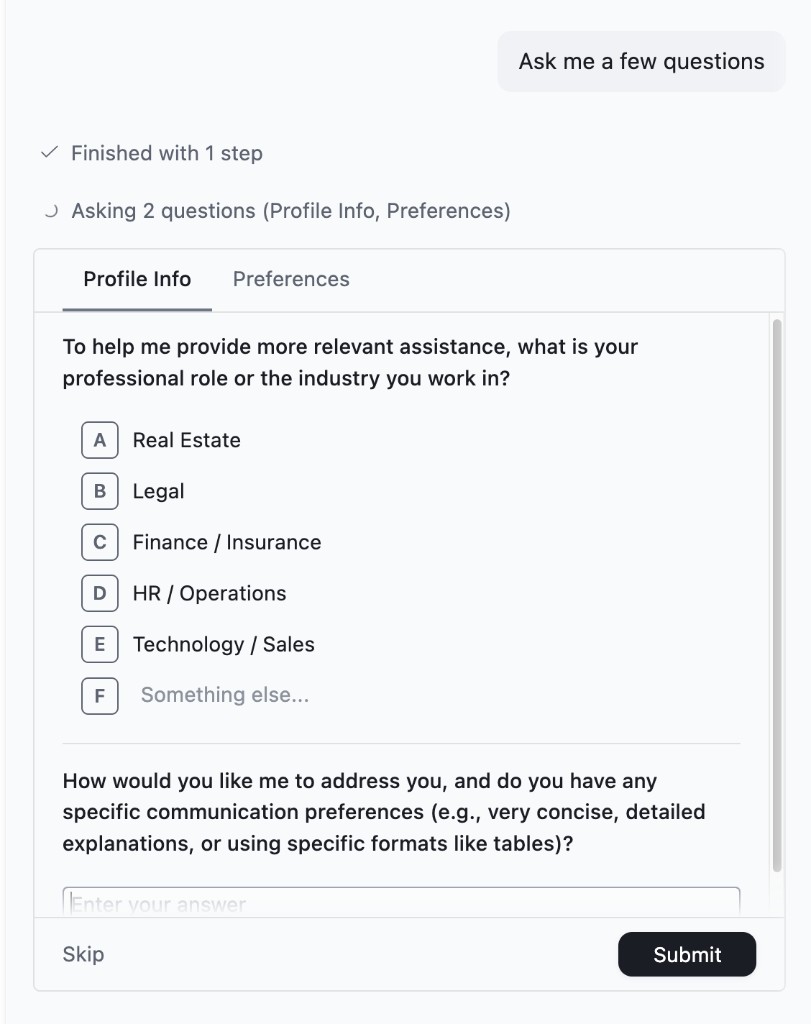
Redesigned Question UI
When Cortex asks you a question, you'll see a clean scrollable carousel with tab navigation. Options are labeled for quick selection, and you can always type a freeform answer alongside the provided choices.
Improvements
- Print any browser tab with Cmd+P / Ctrl+P
- Smarter browser agent with platform-aware skills and improved reliability
- Canvas typing, Gmail, and tab handling work more consistently
- Slim progress bar for document editing instead of a full-screen overlay
- New default Cortex theme
- Improved user memory and memory search
- Letter labels (A, B, C...) on all question options for faster selection
- Cleaner task and skill management interface